Introduction
So you like the idea of Kotekan and want to get started using it? That’s what this page is for!
(This assumes you’e got it installed already. If not, see Compiling Kotekan.)
Running kotekan
Using systemd (full install, recommended for production)
sudo systemctl start kotekan # stop with: sudo systemctl stop kotekan
Configs installed via packages live at /etc/kotekan/.
Direct invocation (development/debug)
sudo ./kotekan -c <config_file>.yaml # binds 0.0.0.0:12048 by default
Use -b <ipv4:port> to change the REST bind address/port (IPv4 only), -s to enable syslog,
and -e '{"foo": "bar"}' to provide Jinja variables for .j2 configs. Running with no -c
starts the REST server only and waits for a POST to /start with the config.
A Simple Pipeline (Quick Start)
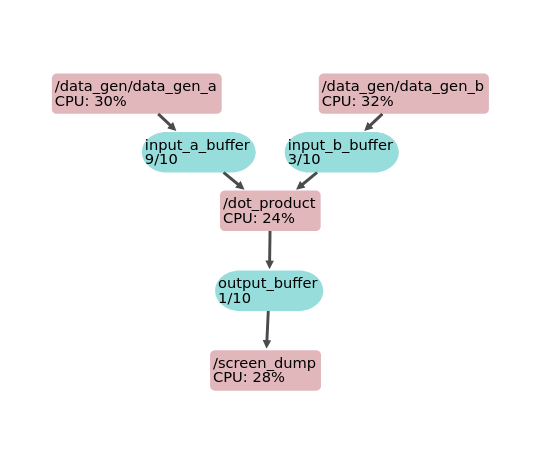
To get things started, let’s configure kotekan to generate two buffers full of data with a constant value, dot product those buffers together, and then print out a summary of the results.
kotekan runs by parsing a configuration file that describes a pipeline. Each config file is written as a YAML file and describes a set of data streams (Buffers) through a series of Stages.
The YAML file starts with a preamble that sets the logging level, the set of CPU cores that kotekan is allowed to run on, and any constants we want to use later in the config file:
---
type: config
# Logging level can be OFF, ERROR, WARN, INFO, DEBUG, or DEBUG2
log_level: DEBUG
# Which CPUs is kotekan allowed to run on?
cpu_affinity: [0, 1, 2, 3]

# Constants
sizeof_float: 4
Next, we declare the input buffers. In Kotekan configuration files, buffers and stages can be declared in arbitrary order, so we are free to describe our pipeline in a way that is readable.
# Construct input buffers
input_buffers:
  # Both input buffers will have the same number of frames, and frame size
    num_frames: 10
    frame_size: 128 * sizeof_float
    input_a_buffer:
        kotekan_buffer: standard
    input_b_buffer:
        kotekan_buffer: standard
Note that the names input_buffers, input_a_buffer, and input_b_buffer are arbitrary. Those names are used within the YAML file, and their hierarchical arrangement are used by Kotekan to set up REST endpoints and other labels.
Similarly, we’ll create the output buffer:
# Construct output buffer
output_buffer:
    num_frames: 10
    frame_size: 128 * sizeof_float
    kotekan_buffer: standard
Next, we will create the producer stages that will fill the input buffers with data. These are created as a tree with data_gen_a and data_gen_b within a data_gen node.
# Create the producer stages that fill the input buffers with data
data_gen:
    data_gen_a:
    # Fills each element of a each frame with a constant value
        kotekan_stage: ExampleProducer
        init_value: 2.0
        out_buf: input_a_buffer
    data_gen_b:
        kotekan_stage: ExampleProducer
        init_value: 3.0
        out_buf: input_b_buffer
After creating the input stages, we will add the dot-product stage that reads from those two input buffers and writes to the output buffer.
# Add the dot-product stage that reads from the input buffers and writes to
# the output buffer.
dot_product:
    kotekan_stage: ExampleDotProduct
    in_a_buf: input_a_buffer
    in_b_buf: input_b_buffer
    out_buf: output_buffer
Finally, we’ll add a consumer stage that reads from the output buffer
and prints summary statistics to the screen. This example uses standard buffers and does not need
a metadata pool; typed buffers (vis, N2, hfb) do require a matching metadata pool.
# Add a consumer stage that prints the output buffer to screen
screen_dump:
    kotekan_stage: ExampleConsumer
    in_buf: output_buffer
All together now:
---
type: config
# Logging level can be OFF, ERROR, WARN, INFO, DEBUG, or DEBUG2
log_level: DEBUG
# Which CPUs is kotekan allowed to run on?
cpu_affinity: [0, 1, 2, 3]

# Constants
sizeof_float: 4

# Construct input buffers
input_buffers:
  # Both input buffers will have the same number of frames, and frame size
    num_frames: 10
    frame_size: 128 * sizeof_float
    input_a_buffer:
        kotekan_buffer: standard
    input_b_buffer:
        kotekan_buffer: standard

# Construct output buffer
output_buffer:
    num_frames: 10
    frame_size: 128 * sizeof_float
    kotekan_buffer: standard

# Create the producer stages that fill the input buffers with data
data_gen:
    data_gen_a:
    # Fills each element of a each frame with a constant value
        kotekan_stage: ExampleProducer
        init_value: 2.0
        out_buf: input_a_buffer
    data_gen_b:
        kotekan_stage: ExampleProducer
        init_value: 3.0
        out_buf: input_b_buffer

# Add the dot-product stage that reads from the input buffers and writes to
# the output buffer.
dot_product:
    kotekan_stage: ExampleDotProduct
    in_a_buf: input_a_buffer
    in_b_buf: input_b_buffer
    out_buf: output_buffer

# Add a consumer stage that prints the output buffer to screen
screen_dump:
    kotekan_stage: ExampleConsumer
    in_buf: output_buffer
One warning is in order: standard buffers are just opaque bytes, while typed buffers (vis/N2/hfb) lock in a specific layout and numeric types (e.g., complex floats for vis/N2, floats for HFB fields). Each stage still expects those payloads, and it is up to the pipeline creator to ensure stages are compatible. In this example, all stages assume float32.
Pipeline Graph
The graph below shows the pipeline of this example and was generated using the Pipeline Viewer.
Execute kotekan
To run kotekan move to the binary directory and pass the config file as an argument:
cd kotekan
./kotekan -c ../../config/examples/dot_product.yaml